
How Domain Name Service (DNS) Filtering Works:
To understand how Domain Name Service (DNS) Filtering operates, let’s start with a brief explanation of the Domain Name Service and how your computer uses it.
A Domain Name is the alphanumeric name of a website ending with a domain suffix like “.com” or “.org” (for example, our company’s Domain Name is ComplianceSpecialistsUSA.com). Domain Name Service (DNS) matches the Domain Name you enter on a device (computer, phone, …) with its specific corresponding IP address. If you have entered that Doman Name before, your device recognizes it. Every type of location or service on the Internet has a specific IP address. That means each time you visit a website, send a chat message, download a file, or watch a video, your device is requesting to match a Domain Name with the specific corresponding IP Address of that specific location or service. Then, a Domain Name Server replies to each request by providing that requested Domain Name’s specific corresponding IP address. Your device uses that specific corresponding IP address to connect to the Domain Name’s location or service.
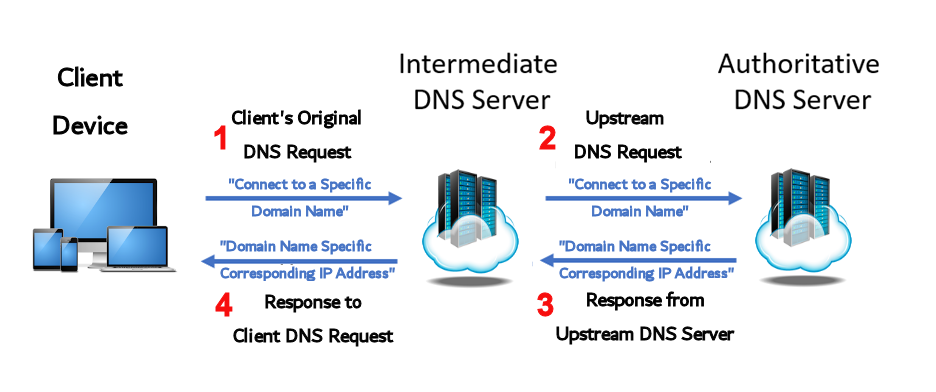
The Life of a Domain Name Service (DNS) Request:
- Your endpoint device generates a request for service.
- If the Intermediate DNS Server does have the IP address, it answers the request (Step 4).
If the Intermediate DNS Server does not have the IP address, it sends the request upstream to another DNS Server. The request continues upstream until an Authoritative Server answers. - The Authoritative DNS Server answers the request with the IP address.
- The Intermediate Server stores the name and IP address data in its cache for future use and sends the IP address back to the endpoint device. The endpoint device stores the name and IP address data in its cache and makes another request only if the information times out or the cache is cleared.
Intermediate DNS Servers do not Include Filtering (what?)!
The DNS servers provided by your Internet Service Providers (ISPs) are Intermediate DNS servers. There are also Intermediate “public” DNS servers provided by Google, Yahoo and other. These intermediate DNS servers do not, repeat do not, include any customizable filtering capability for you. Without customized filtering capability, your computers believe whatever they are told by a DNS server.
When a DNS server is hacked, taken over, “poisoned” by Internet Criminals, your computer and your system and your business data are at grave risk without a confident and effective capability to filter every DNS request.
This is why Domain Name Service (DNS) Filtering service is so business-critical today, because it uses specific private DNS Filter servers built for the express purpose of filtering DNS requests.
The Life of a Domain Name Service (DNS) Request
When Domain Name Service (DNS) Filtering Provides Your Business
A Private DNS Server
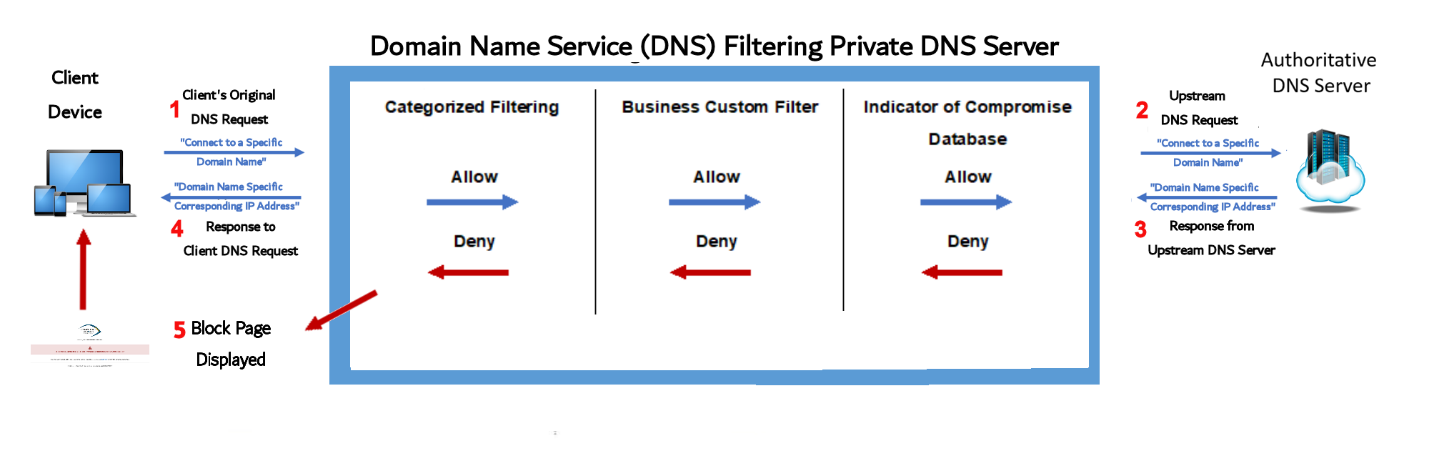
Domain Name Service (DNS) Filtering Provides A Private DNS Server:
When Your Business Has Domain Name Service (DNS) Filtering, a Private DNS Server Handles Every DNS Request. Your Private DNS Server Brings a Confident and Effective Capability to Filter Every DNS Request. This Prevents Every DNS Request from Connecting With A Potentially Compromised Site.
- Your endpoint device generates a request for service.
Your Private DNS Server Handles the Request as follows:
Your private DNS Server employed by Domain Name Service (DNS) Filtering compares the DNS specific domain name request with the domain names in three filters:
- The Customized Category Filter
[Your business creates this filter to disallow access to specific
categories of sites (ex.’s: gambling, adult content, shopping sites,…) ]
- If no category match is found, then the request is allowed to proceed to the Business Custom Filter check;
- If the request is part of a blocked category, then it is denied (5) and the Block Page is displayed on the client screen. No IP address is supplied to the client device.
- The Business Custom Filter
[Your business creates this filter to disallow (or allow) access to specific
domain names (ex.’s: yourbestvegasodds.cash , ditchyourjob.com ,
mystrangecomputer.net, showyourbosssomelove.com ,
extramoneywhileatwork.biz ]
- If a match is allowed, then the request proceeds to the Indicator of Compromise Database check;
- If a match is disallowed, then the request is denied (5) and the Block Page is displayed on the client screen. No IP address is supplied to the client device.
- The Indicator of Compromise Database Filter
[Security companies collaborate to create this filter which documents
and disallows access to known-compromised sites.]
- If no match is found, then the request is allowed to proceed
to step 2.
- If a match is found, then the request is denied (5) and the Block Page is displayed on the client screen. No IP address is supplied to the client device.
- If your private DNS Server employed by Domain Name Service (DNS) Filtering does have the IP address, it answers the request (Step 4).
If your private DNS Server does not have the IP address, it sends the request upstream to another DNS Server. The request continues upstream until an Authoritative Server answers. - The Authoritative DNS Server answers the request with the IP address.
- Your private DNS Server employed by Domain Name Service (DNS) Filtering stores the name and IP address data in its cache for future use and sends the IP address back to the endpoint device. The endpoint device stores the name and IP address data in its cache and makes another request only if the information times out or the cache is cleared.
Domain Name Service (DNS) Filtering service improves your business systems security, reduces downtime, and ensures compliance with all Data Security & Privacy laws.
Make sure your business is protected from increasingly common threats from Internet Criminals and is fully in Compliance with all relevant Data Security & Privacy Laws.
CLICK Here https://compliancespecialistsusa.com/protect-yourself-services/ for information on the 5 Layers of Small Business Security Protecting Your Data or to select from our Solid Foundation Compliance Programs™ to fit your business,
Or CLICK Here https://compliancespecialistsusa.com/contact/ if you have any questions! Compliance Specialists. We are Protecting You To Grow™!
