
How Endpoint Backup Works
Endpoint Backup is a direct-to-cloud secure encrypted software backup, which replicates and stores your data to the secure, private cloud supplied by the Datto company (parent company Kaseya). Your data is replicated every two hours to protect from loss due to downtime, outages or cyberattacks of all kinds.
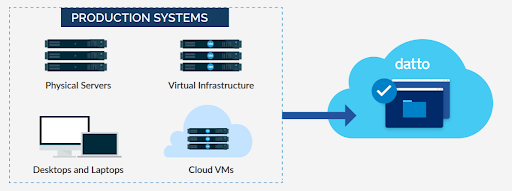
Security Options of Endpoint Backup
- Multifactor authentication is required to access the Endpoint Backup system.
- All your data is securely encrypted before being transmitted to the private Datto cloud.
- The encryption protocol used is SSL (Secure Sockets Layer), now commonly known as TLS (Transport Layer Security). It ensures secure communication over a computer network. It protects data transmitted between a web server and a client (like your web browser).
Recovery Options of Endpoint Backup
- File and Folder Recovery: The Endpoint Backup system allows files or folders to be selected from the desired date and time for recovery back to your Endpoint.
- Bare Metal Recovery (BMR): The Endpoint Backup system enables recovery of a complete system to the same or dissimilar hardware. For example: A hard drive dies with all your data on it. Your computer does not even start because the hard drive has failed. You get a new hard drive, and the complete system is recovered to your new, empty hard drive.
- Cloud-based Virtual Machine: Similar Bare Metal Recovery (BMR) process, above, Cloud-based Virtual Machine enables recovery of a complete system onto a cloud-based Virtual Machine. You access your data there, as if you were on your own Endpoint. This can be useful while waiting for new equipment to arrive, avoiding downtime. It is also used to verify that the backup is recoverable without the need to recover onto Endpoint hardware.
Bandwidth Throttling
Bandwidth Throttling limits internet connection usage, thereby reducing the impact of a backup on other business functions that are using the same internet connection.
Email Alerting
- Email Alerting communicates the status of backups. We alert on any failure, and we send those alerts to our service ticket system for active response & remediation.
Features of the Endpoint Backup system
Inverse Chain Technology™ vs Traditional Full and Incremental Backup
Datto’s Inverse Chain Technology is an efficient and resilient alternative to the slower traditional backup chain. It is designed to offer the fastest possible restore times, increase reliability, and keep capacity demands in check.
The traditional backup chain requiring incremental backups has operated on the same basic principle since tape was the preferred target. First, a full backup is created. Subsequent backups copy only the data that has changed since that initial full backup. These incremental backups are fast and require minimal processing power, because you aren’t copying a whole lot of data.
In the traditional backup chain, in order to recover data, the backup system must rebuild a full backup from a chain of incremental backups. That slow rebuild process was only part of the problem. The larger part was that the full backup and every subsequent incremental have a dependent relationship. So, if one incremental were corrupt, all of the recovery points that follow it were unusable. Additionally, there was no way to delete older incremental backups. The prudent option became doing full backups regularly augmented by incremental backups in between.
How Inverse Chain Technology™ Works
Datto’s Inverse Chain Technology™ provides an streamlined solution to issues associated with traditional backup chains. Each time a snapshot-based incremental backup is taken, changes are replicated to Datto’s cloud creating an up-to-date device “image” (i.e. a complete copy of the protected device, including data, OS, applications, settings, etc.) Instead of chains of dependent incremental backups, Inverse Chain Technology stores every previous recovery point in an independent, fully constructed state, so there is no rebuild process when reverting to a previous point in time.
People might ask, “Doesn’t that require a ton of storage?” Thankfully, no. Inverse Chain was engineered to optimize capacity requirements. Inverse Chain Technology™ uses the Zettabyte File System’s (ZFS’s) “copy on write” (CoW) capability, so each unique block of data is saved only once and is referenced by all of the restore points that use it. Also, since each point is completely independent you can delete older recovery points that are no longer necessary—further reducing capacity demands.
Remarkably, in the event of an outage on a device, Inverse Chain Technology™ allows you to very, very quickly access your stored data on a virtual machine in Datto’s cloud! This dramatically reduces your business’ Recovery Time Objective (RTO).
ZFS’s “Copy on Write” Capability
ZFS (Zettabyte File System) is a file system known for its advanced features, one of which is the “copy on write” (CoW) feature mentioned in the previous paragraph. This feature is a fundamental part of how ZFS handles data modifications.
Here is How “Copy on Write” (CoW) Works:
- Read Operation: When a file is read, ZFS directly accesses the data from the storage medium.
- Write Operation: When a file is modified, ZFS creates a new version of the file, including the modifications. ZFS does not overwrite the previous version. The previous version remains unchanged.
- Pointer Update: ZFS updates the document control metadata so that it points to the new version of the file.
- Old Data Cleanup: The previous version of the file is marked as “deleted”, however it can be “undeleted” by ZFS as needed (similar to the “Trash can” on your computer’s desktop).
Benefits of “Copy on Write” (CoW):
- Data Integrity: CoW helps maintain data integrity by preventing accidental overwrites.
- Snapshotting: ZFS’s snapshot feature relies heavily on CoW. Creating a snapshot is essentially a point-in-time copy of the file system, capturing the data at that moment.
- Concurrent Access: Multiple processes can access the same file simultaneously without interfering with each other.
- Undo and Redo Functions: CoW includes Undo and Redo that allows users to recover previous changes.
- Performance: CoW improves data integrity & consistency. It also introduces write amplification, especially in scenarios with frequent small writes.
- Storage Efficiency: ZFS uses deduplication & compression to optimize storage usage, which reduces the total storage space required by CoW.
- Reclaiming Storage Space: ZFS’s “Garbage Collection” process safely & effectively reclaims storage space, and it defragments files to increase the efficiency and speed of accessing those files.
Why an Integrated Solution?
Today, Protecting Your Business Requires Endpoint Backup.
At Compliance Specialists, our Secure Endpoint Monitoring system integrates multiple processes, including the Endpoint Backup, that in real-time identifies a growing list of potentially negative events. Our system automatically generates a high-priority service ticket for any failed backup. This speeds active response & remediation, and provides compliance reporting.
Make sure your business is protected from increasingly common threats from Internet Criminals and is fully in Compliance with all relevant Data Security & Privacy Laws.
CLICK Here for information on the 5 Layers of Small Business Security Protecting Your Data or to select from our Solid Foundation Compliance Programs™ to fit your business,
Or CLICK Here if you have any questions! Compliance Specialists. We are Protecting You To Grow™!
